
Introduction
Most guides on this topic talk about “the reader” and “the search engine” as if they’re two separate people you have to keep happy at the same time. Google says as much in its own documentation its systems are built around rewarding content that’s actually useful, and SEO is just the part that helps the right person find it.
It was never supposed to be a replacement for having something worth saying in the first place.So here’s the order I’d actually work in write for the person who typed the question. Then go back and structure the answer so a search engine can make sense of it too. Do it in that order and you’re already ahead of a lot of what currently ranks.
What Does “SEO-Friendly” Even Mean
If you strip the jargon out, it’s a page a search engine can crawl and understand. That also satisfies whoever searched for it well enough that they don’t immediately go back and click the next result. That’s basically the whole test,what it doesn’t mean despite what a lot of older advice.
Still implies is hitting some keyword density percentage, or repeating your target phrase five times per 500 words. Search engines got a lot better at understanding meaning over the last several years. That kind of repetition reads as a warning sign now, not a ranking booster.
1. Work Out the Search Intent Before You Write Anything

Before typing a single word, ask why someone would be searching this. It usually lands in one of four buckets Informational, where someone wants to learn something (“how to write a blog post”). Commercial, where they’re comparing options before deciding (“best SEO tools”).
Transactional, where they’re ready to buy or sign up (“SEO course pricing”). And navigational, where they’re just trying to find a specific site (“Yoast login”).This piece is informational, which shapes everything about it.
The job is to actually answer the questions someone has not pitch them on anything. Get the intent wrong and no amount of keyword work saves you. A perfectly optimized sales page still won’t rank for a question someone wanted explained, because it’s answering something nobody asked.
2. Build a Keyword List, Then Mostly Let It Go

Once you know the intent, pull together a primary keyword, a few secondary ones. And whatever long-tail phrases and questions real people are typing. You don’t need expensive tools for this part Google hands you most of it for free through autocomplete. The “People also ask” box, and the related searches at the bottom of the page.
Where the primary keyword should end up the title and H1, somewhere in the first hundred words. At least one H2, scattered naturally through the body, the meta description, the slug, and somewhere near the end too.
But “naturally” is doing most of the work in that last sentence, and it’s the part people skip. If a sentence sounds off because you crammed a keyword into it. Cut the keyword don’t just live with the clunky sentence. Google flags exactly this in its own guidance writing for search engines instead of for people is the habit to avoid.
3. Structure It So People Can Skim It
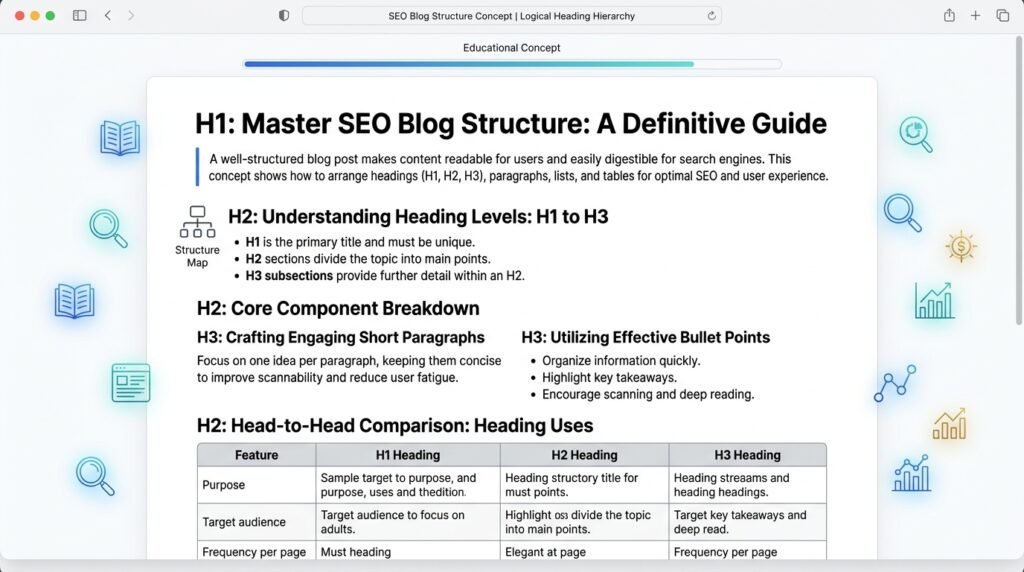
Readers and search engines both lean on structure to figure out what a page is about, quickly. One H1 for the title, H2s for the major sections, H3s only where a section genuinely splits into sub-points. Most people online aren’t reading top to bottom anyway. They scan the headings first and decide from there whether to slow down.
A few things that help on both fronts:
- Keep paragraphs short three or four sentences, usually
- Use lists for steps or comparisons, because it’s genuinely easier to follow, not because it looks SEO-friendly
- Add a table only when you’re comparing real things, not to pad the page
- Write subheadings that describe what’s actually in the section “More Info” tells nobody anything
4. Just Answer the Question

For anything a reader might type as a direct question, put the direct answer right under the heading 40 to 60 words, something like that before going into more depth. This happens to be the format Google often pulls into featured snippets.
But that’s really a side effect. The actual reason to do it is respect for the reader who just wants the fast answer and would rather skim past your explanation than dig for it.
Example “What is an SEO-friendly blog post?”
It’s a post a search engine can crawl and understand easily, that also answers the reader’s actual question well enough that they don’t need to check another result. Keyword relevance, structure, and genuine quality all play a role here. Density on its own doesn’t.
5. Write Like an Actual Person Wrote It

This is where a lot of “SEO content” as they say, and a lot of AI-generated content fails. Use sentences of different lengths. Use active voice, cut the filler. The words “In today’s fast-paced digital landscape” say nothing new to your reader.
It takes one sentence to the reader to make the point you are trying to make. Use a specific thing, there’s no question, “Cut your bounce rate” is a better phrase than “Improve your key metrics. Be especially alert for these patterns as they will appear as if they were generated, regardless of who wrote them.
There are paragraphs that open with the same phrase, “It is important to note that and adjectives that are used three to four times: comprehensive, in-depth, detailed, etc. and paragraphs that end with a repetition of the introduction in a new phrase.
Transitions, that would sound good in any other paragraph on the web.This is a thing that does help read the draft aloud. If you wouldn’t say a sentence this way to another person sitting across from you, then it needs to be rewritten.
6. Back Up What You’re Claiming

If you’re stating a number, referencing a study, or calling something a “best practice,” link to where it actually came from. An official source, a research body, or for SEO specifically, Google’s own documentation. This isn’t just about being honest, though it is that. It’s part of how Google’s quality raters assess trustworthiness.
Which is one piece of what the company calls E-E-A-T experience, expertise, authoritativeness, trustworthiness. Google has said trust matters most of those four, and that a page doesn’t need to check every single box to be considered high quality. Don’t make up a number to sound more credible.
7. Handle the Boring Technical Stuff

Even a well written post can be down voted due to minor things unprovided. The keyword is in the title tag, and does not exceed the length of about 50-60 characters to avoid being cut off in search results. Meta description is meant for humans who are deciding whether to click, not stuffed with variants of the keywords.
The URL slug is concise and easy to understand, no filler words and no dates that are superfluous. Internal links include anchor text that clearly describes the target of the link, and go to a place that is actually relevant to that text.
Alt text is a description of the content of the image, and it may be part of the search result for images. None of this will make a mediocre post rank. What it does is stop a good post from losing ground to friction that had nothing to do with the writing itself.
8. Make Sure It Adds Something
Search engines can identify content that simply rearranges existing material. To stand out, provide unique examples, a new organization of information, or more thorough comparisons. Originality here doesn’t mean weird for the sake of it. It means someone reading your page gets something they couldn’t have gotten just as easily from the page above it.
Real Life Examples
Case Study: HubSpot
HubSpot demonstrates the role of aligning content with the intent of the searcher in boosting SEO results. It’s a recipe of education, helpful free tools and content answering user questions. It facilitated HubSpot to get millions of organic traffic through search.
The website provides a variety of additional resources, such as a blog that features HubSpot SEO case studies.The site offers several other features, including a blog with HubSpot SEO case studies.
Case Study: Examine.com
Examine.com has seen their organic traffic increase through the use of evidence-based, trustworthy content, and they have been steadily enhancing their articles. The methodology demonstrates how original research and valuable information can enhance the SEO efforts.
The key to unlocking the secrets of website traffic lies in the power of backlinks. Backlinks are the secret sauce behind website traffic.
Frequently Asked Questions
What’s a good length for an SEO blog post?
There is no magic number that will guarantee a ranking. If it’s an information question, end your writing between 1,000 and 2,000 words once the question is answered completely. The rule of thumb is that padding to a round number is not effective and it is misleading.
Where should the primary keyword go first?
Ideally the title, the H1, and somewhere in the first paragraph or two, phrased the way you’d naturally say it rather than forced in.
Do I have to use every keyword a research tool suggests?
No. That list is a map of what people are actually searching, not a checklist you’re obligated to complete. Use what fits and skip the rest.
Does keyword density still matter the way it used to?
Not really. Search engines are evaluating meaning and topical relevance more than counting exact repetitions now. Overdoing it can hurt readability without helping the ranking at all.
How many headings does a post need?
As many as the content genuinely calls for. One H1, however many H2s the major sections require, H3s only where there’s a real subsection. Adding headings purely to fit in more keywords tends to backfire.
Should I update an old post or write a new one?
Often, update. Refreshing an existing post with more current information or a fuller answer tends to work better than publishing something near-duplicate on the same topic.
Do backlinks still matter?
Yes, as one signal among several. They don’t replace relevance and quality, but they still factor into how search engines judge authority.
Conclusion
Writing an SEO friendly blog post isn’t having to stuff keywords in or regarding a formula. It begins with figuring out what exactly people are looking for when they search and then providing content that is understandable and meets their needs in a natural way. The content is understood by the search engines.
When it has a good structure, relevant keywords, useful examples, trustworthy sources, and basic technical SEO.The most crucially, the reader comes first. Write something useful, scannable and truly readable. If you are providing useful information for people instead of just trying to rank, then SEO will be much more effective.